
Apache-2.0 · Free & open source
One GitHub repo.
Every AI agent.
Every device.
Keep every SKILL.md in a GitHub repo you own. Manage it with a fast Go CLI and TUI, give agents a tiny gateway skill, or use the native macOS app. No hand-copying dot-folders between machines.
Agent dot-folders recognized during discovery
Headless commands plus an interactive dashboard
Ways to work: CLI/TUI, gateway skill, and macOS app
GitHub repo remains your source of truth
The problem
Skills trapped in local folders drift.
A skill changes on your laptop but not your desktop or remote machine. Each agent keeps another copy. Skills Registry makes the repo—not a pile of dot-folders—the durable source.
Duplication and drift
- ~/.claude/skills/code-review
- ~/.cursor/skills/code-review
- ~/.codex/skills/code-review
- Repeat on every machine
Versioned, searchable, portable
- One GitHub repo you control
- CLI access from any authenticated machine
- A gateway tells agents how to search and fetch
- Normal Git history, branches, forks, and PRs
How it works
GitHub is the registry. Your tools are the clients.
Reads use a local shallow mirror; writes create normal commits through GitHub.
Discover
The wizard scans known agent folders and finds existing skills.
Bootstrap
Create a private or public GitHub repo and push the initial skill tree.
Manage
Browse, search, add, sync, publish, remove, and update from the TUI or commands.
Read quickly
A shallow local Git mirror makes repeat listing and fetching fast.
Delegate
The gateway skill teaches compatible agents to invoke the CLI only when a skill is needed.
Work anywhere
Point another laptop, desktop, or remote machine at the same repository.
Architecture
One registry. Three focused interfaces.
Choose the terminal, let an agent follow the gateway, or use a native desktop interface. They share the same GitHub-backed model.
Charmbracelet onboarding wizard, dashboard TUI, and scriptable JSON-capable commands.
GitHub Releases · npm launcher · macOS/Linux/Windows
A small instruction file installed into agent folders. It delegates registry search and retrieval to the CLI instead of duplicating every skill.
Generated by bootstrap · readable and editable
Native browsing, Markdown previews, fuzzy search, publishing, removal, and bulk import.
macOS · Apple Silicon
Gateway skill
A small pointer, not another copy.
Bootstrap installs a human-readable gateway into selected agent folders. It tells the agent to search your registry and fetch the matching skill through the CLI when needed.
# Agent workflow
skills-registry search "review this pull request" --json
skills-registry get code-review --json

# The repository remains the source of truth.
# The requested skill is materialized only when needed.
CLI + TUI
Interactive for people. Headless for scripts and agents.
Run the binary without arguments for the wizard or dashboard. Every subcommand also supports structured output with --json.
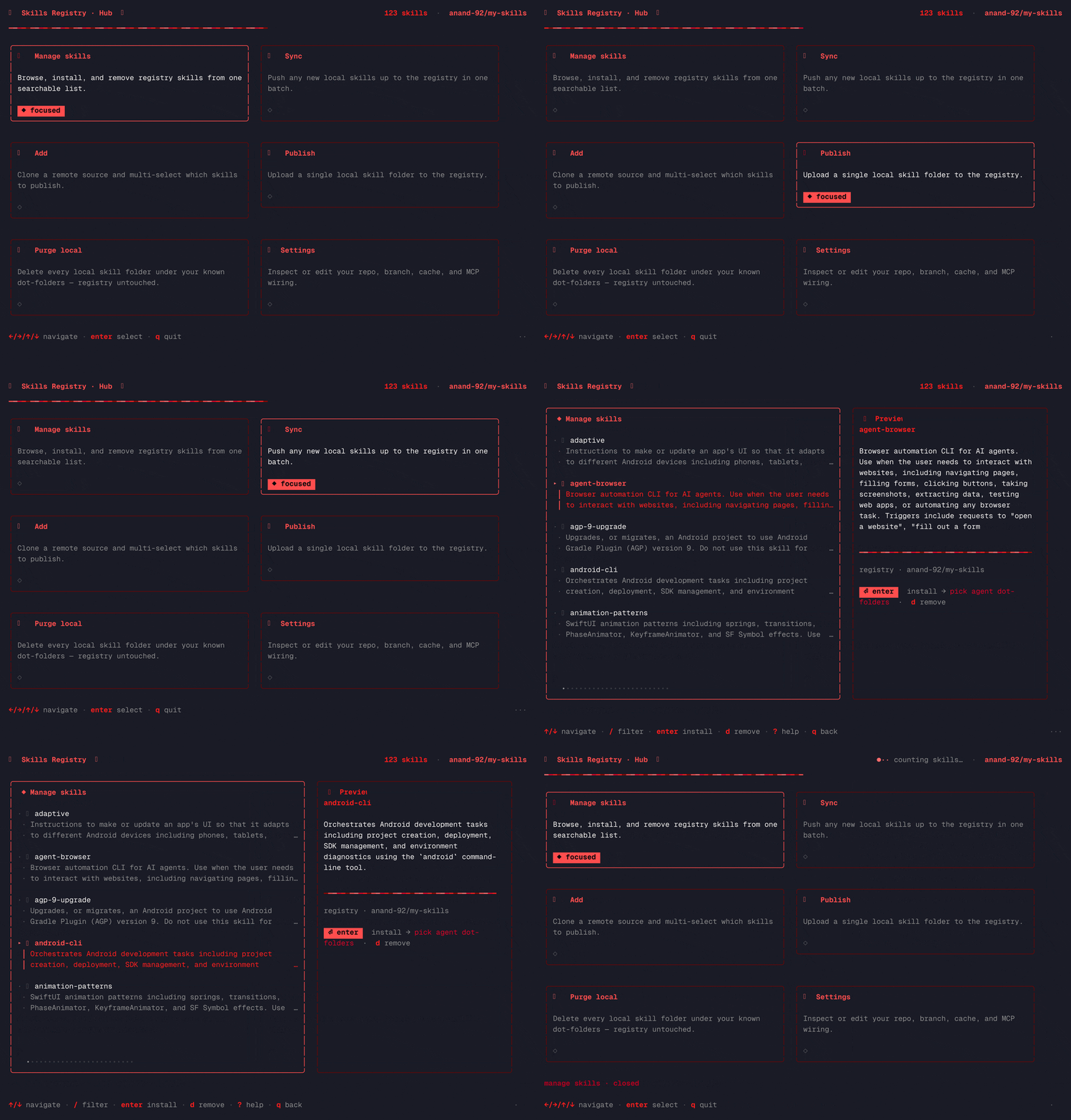
| Command | What it does |
|---|---|
| skills-registry | Launch onboarding on first run, then the dashboard. |
| skills-registry list / search | Browse all skills or fuzzy-rank a query. |
| skills-registry get <slug> | Fetch one skill from the configured registry. |
| skills-registry sync | Publish newly discovered local skills. |
| skills-registry add <owner/repo> | Select skills from another GitHub registry. |
| skills-registry publish / remove | Commit a skill update or remove a registry entry. |
| skills-registry update | Update the installed CLI binary. |
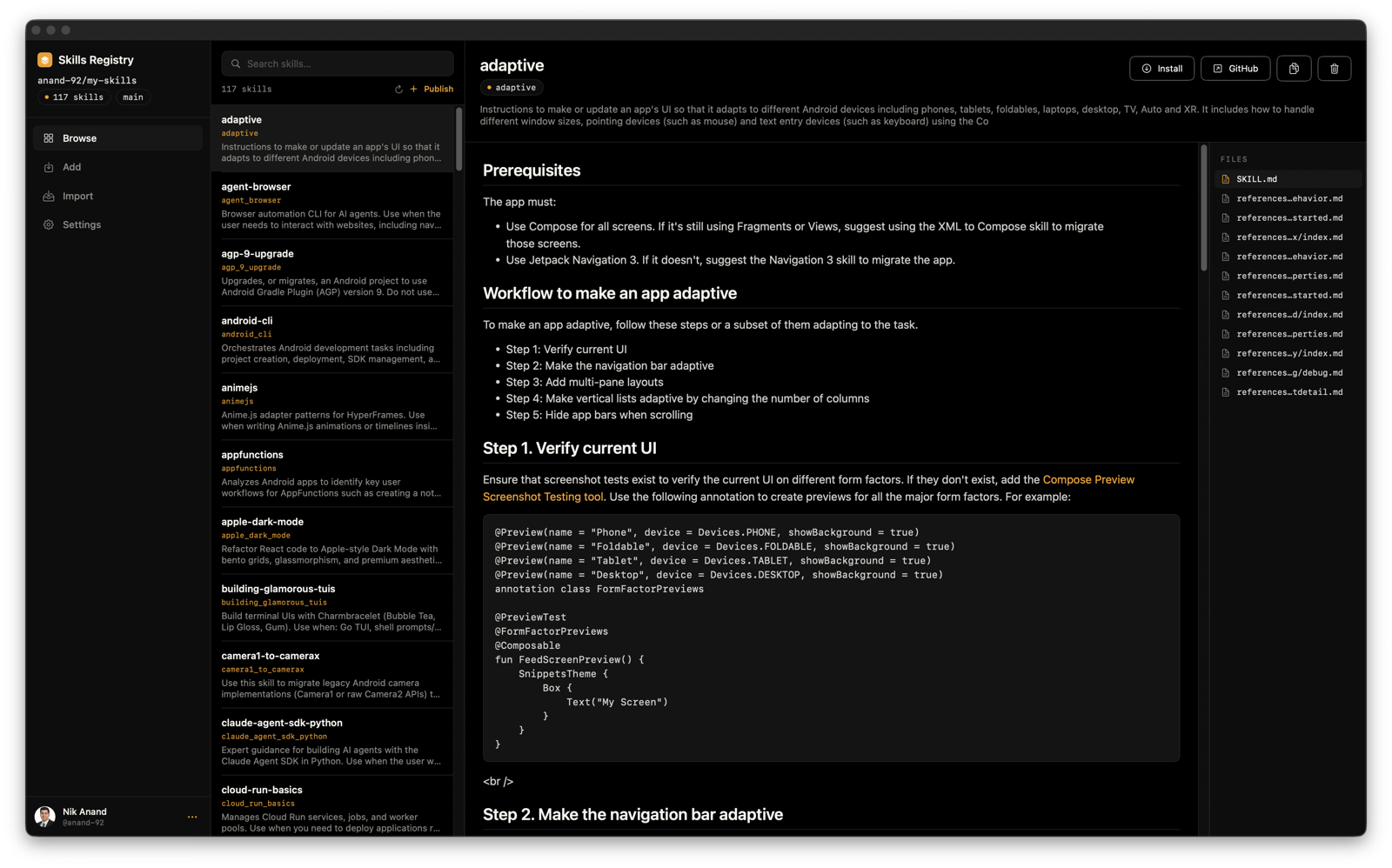
Native macOS app
The same registry, without the terminal.
The Apple Silicon SwiftUI app supports GitHub login, rich Markdown browsing, fuzzy search, publishing, removal, bulk local import, and one-click CLI installation.
Comparison
Purpose-built for skills, built on ordinary Git.
| Capability | Local folders | Dotfiles repo | Skills Registry |
|---|---|---|---|
| One source for every agent | no | yes | yes |
| Guided discovery and import | no | no | yes |
| Search and fetch on demand | no | manual | yes |
| Branches, forks, and PRs | no | yes | yes |
| Interactive TUI and native app | no | no | yes |
| Structured automation output | no | no | --json |
Install
From zero to your own registry.
Install the Go CLI
Use the shell installer, PowerShell installer, or npm launcher.
Run
skills-registryThe wizard discovers local skills and asks where your registry should live.
Create and populate the repo
Authenticate with GitHub CLI, choose visibility, and push the initial tree.
Select your agents
Install the gateway skill into the agent folders you use.
# macOS / Linux
curl -fsSL https://raw.githubusercontent.com/nikships/skills-registry/main/install.sh | sh

# npm launcher
npx skills-registry

# Windows PowerShell
irm https://raw.githubusercontent.com/nikships/skills-registry/main/install.ps1 | iexYour skills. Your repo. Your workflow.
No account, telemetry, or paid tier. Inspect the source, open an issue, and keep your registry wherever you choose on GitHub.